Inventory and profit tracking for antique booth vendors

Know what you own, where it’s recorded, and what your records show you earned.

Track inventory across booths and storage, enter acquisition costs and location fee rules, and review per-sale and location-period results from your records—without wrestling with spreadsheets.

  • 30-day Pro trial
  • No credit card required to start
  • Cancel anytime
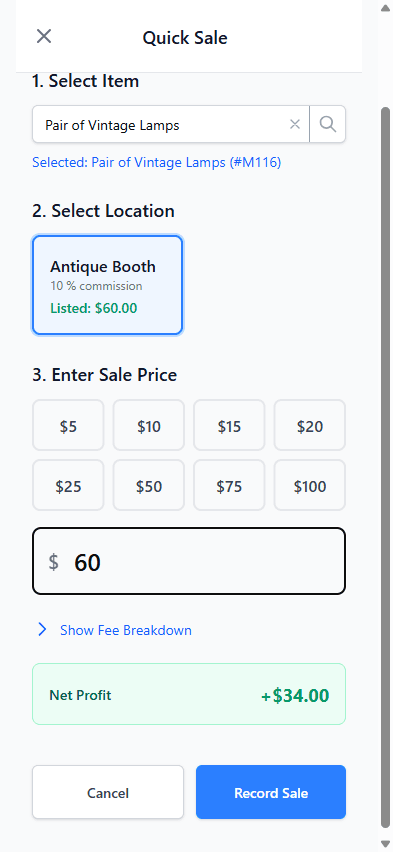
MaxIMS item net-revenue breakdown showing $60 revenue, $20 cost of goods, $6 channel fees, and $34 net.

Running a booth is easy to love and hard to keep track of

  • Your records are scattered

    Some items are on a spreadsheet, some on receipts, some only in your head—split between the booth, the storage unit, and the car.

  • What you paid gets lost by the time it sells

    The price you paid at an estate sale months ago is hard to match to the item that just sold.

  • The mall report shows sales, not profit

    Your sales report or payout shows what sold and what you’re paid. It doesn’t know what each piece cost you, so profit isn’t obvious.

  • You’re not sure the payout adds up

    When the check or deposit arrives, it’s hard to tell whether it matches the sales you recorded and the fees you agreed to.

How it works

  1. Step 1: Add items and acquisition costs

    Record what you own and what each piece cost you to acquire, plus any listing details you want to keep with it.

  2. Step 2: Set up locations and fees

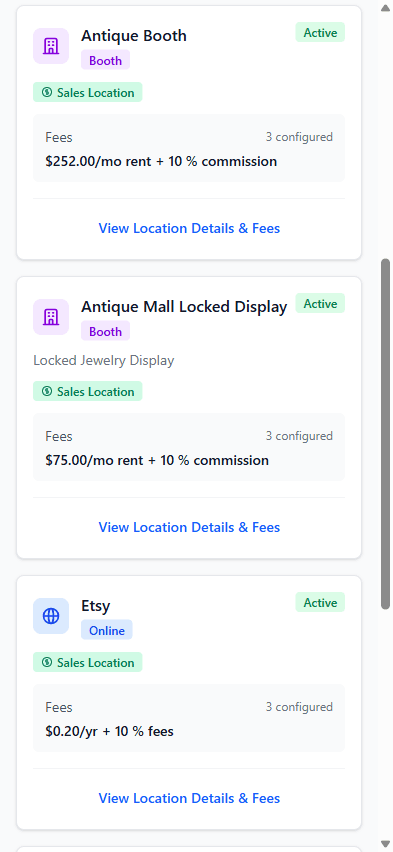
    Add each booth or other selling location with the rent, commission, and fee rules that apply there—fixed or percentage, tiered, card-only or cash-only, with start and end dates.

  3. Step 3: Record sales and review results

    Record the item, location, sale price, date, and payment method. MaxIMS applies eligible percentage-based fees to the recorded sale and calculates the payout to expect from recorded sales and eligible configured fees for the period.

Every result comes from what you enter. A sale’s profit reflects the item’s acquisition cost and eligible percentage-based fees for that sale. Recurring charges aren’t split across sales; when a charge is enabled for reconciliation and its frequency matches the period, MaxIMS includes it in the expected payout calculation.

What you can see once your records are in

Keep item cost, listing price, and estimated net together

Each item keeps its description, purchase price and cost of goods, listed price at each sales location, and a pre-sale net estimate after COGS and eligible percentage-based fees. Recurring rent is not included in that estimate.
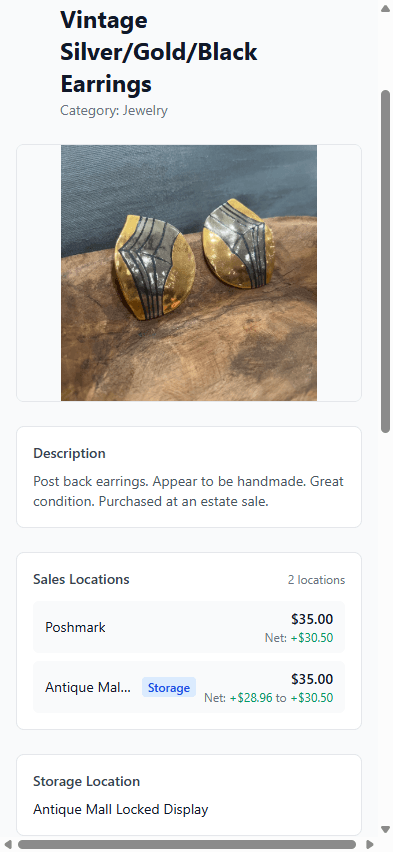
MaxIMS item detail for amber glass lamps showing a $60 location listing, an estimated $34 net, and a $20 purchase price and cost of goods.
At the $60 listed price, MaxIMS estimates $34 net after $20 COGS and eligible percentage-based fees; recurring rent is excluded.

See the arithmetic behind an item’s net

Keep revenue, item cost, and channel fees together so you can review the net-revenue breakdown from the values and fee rules in your records.

MaxIMS item net-revenue breakdown showing $60 revenue, $20 cost of goods, $6 channel fees, and $34 net.
$60 revenue minus $20 item cost and $6 in channel fees leaves $34 net.

Compare expected and received payouts

For a location and period, MaxIMS calculates the expected payout from recorded sales and eligible configured fees. A recurring charge is included only when it is enabled for reconciliation and its frequency matches the period.

When the mall’s payment arrives, enter the actual amount received and review the variance. MaxIMS doesn’t import, read, or interpret mall statements.

Review results by item, location, and period

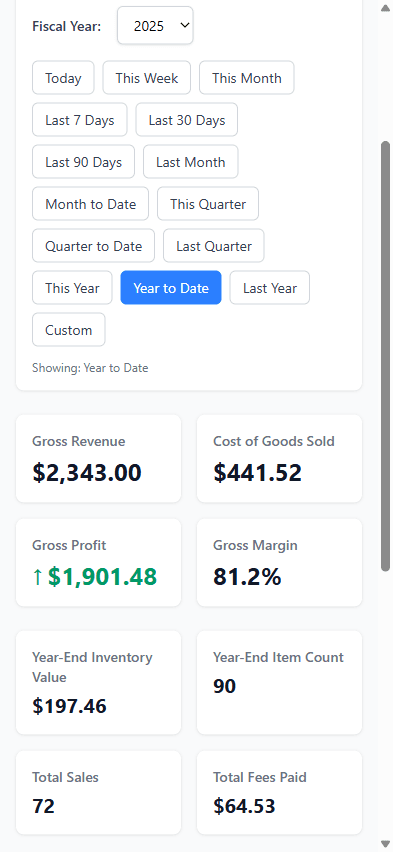
Filter reports by date range to review revenue, cost of goods sold, profit, margin, and fees paid, and break results down by location or by item across up to five Pro locations. Reports export to CSV.

Profit in these reports subtracts item costs and eligible per-sale fees. Recurring booth rent is not in these profit totals; it affects expected payout only when enabled for reconciliation and applicable to the selected period.

MaxIMS monthly sales summary showing one sale, $60 in gross revenue, $34 in net profit, a 56.7% profit margin, and a revenue-and-profit chart.
A monthly sales summary showing revenue, net profit, margin, and their trend.

Who it’s for

  • Antique-mall booth vendors

    You rent one or more booths or cases and want each piece’s cost, sale, and fees in one place.

  • Vintage and resale sellers

    You sell from a booth, keep stock in storage, and record some online sales by hand.

  • Multi-location sellers who’ve outgrown a spreadsheet

    Different rent and commission at each location has made the spreadsheet hard to trust.

MaxIMS Pro

$15/month or $150/year

Billing after your trial
  • One user
  • Unlimited inventory items
  • Up to five selling locations
  • Cost-of-goods tracking
  • Location fee calculations
  • Basic reports with CSV export

30-day free trial · No credit card required to start · Cancel anytime in your account

Questions before you start

Three things: a selling location with its fees, an item with what you paid for it, and a sale recorded against that item and location. The sale’s net profit is calculated as soon as it’s recorded.

MaxIMS doesn’t create a location for you, so start with your booth and its rent and commission. How long setup takes depends on how many items and locations you add.

Yes. Pro includes up to five selling locations—booths, a locked case, or an online shop whose sales you record by hand—each with its own fee rules. Each item can also have a storage location.

Not automatically. MaxIMS doesn’t import spreadsheets today, so items are added in the app. Reports can be exported as CSV files.

No. MaxIMS doesn’t import, read, or interpret mall statements, and it doesn’t sync with malls or marketplaces. You record sales and set up location fees; MaxIMS calculates expected payout from recorded sales and eligible configured fees, and you enter the actual amount received to compare the two.

No. MaxIMS tracks inventory, sales, fees, and profit from the records you enter. It isn’t accounting software and doesn’t give tax or accounting advice. Its reports, including a year-end summary, export to CSV for whoever does your books.

You’ll get reminder emails before the trial ends. Add a payment method to keep Pro at $15/month or $150/year. If you don’t, your account moves to the free Starter plan: your data is kept, and Starter’s limits apply from then on.

No credit card is required to start the trial. After you subscribe, you can cancel in your account. Your data is kept, and the account moves to the free Starter plan when the period you paid for ends.

See which recorded sales show a profit after entered costs and configured fees.

Your numbers come from the records you enter: item costs, sales, and each location’s fees. Per-sale profit covers the item’s cost and eligible sale fees. Recurring charges affect expected payout only when enabled for reconciliation and applicable to the selected period.

30-day Pro trial · No credit card required to start · Cancel anytime

We use optional cookies only if you allow them. Storage that remembers your choice is always on.

Optional cookies

You can change your choices at any time with “Cookie settings” at the bottom of the page. See our Privacy Policy.